Expand Your Member Business Locally & Nationwide with the Chamber Perks App™
The Chamber Perks App™ is intended to assist businesses in attracting new customers, fostering loyalty, and boosting sales both locally and nationally. Offering a variety of perks can enhance engagement and help you distinguish yourself in your industry.
Attract New Customers
Establish exclusive perks to entice potential customers and distinguish yourself from competitors.
Build Customer Loyalty
Provide ongoing incentives to convert first-time buyers into repeat customers.
Enhance Your Exposure
Ensure your perks are visible to all app users throughout Canada.
Manage Employee Perks
Effortlessly develop and oversee your own employee discount program to enhance employee retention and morale.
24/7 Control
Create, update, and manage your perks anytime, anywhere.
Real-Time Insights
Track perk views to assess performance and enhance your offers.
Start by downloading the Free Chamber Perks App™ and connect with us to get your member credentials to access the opportunities available exclusively to our members!
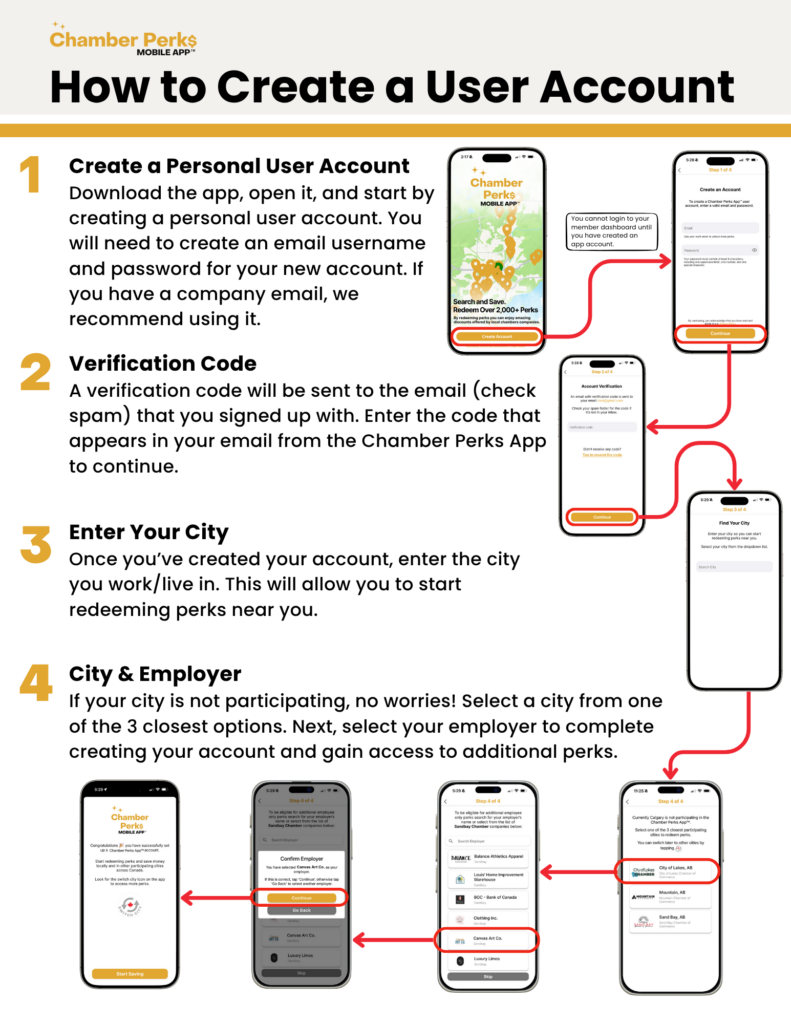
How To Create A User Account
1
Create a Personal User Account
Download the app, open it, and start by creating a personal user account. You will need to create an email username and password for your new account. If you have a company email, we recommend using it.
2
Verification Code
A verification code will be sent to your email (check spam) that you signed up with. Enter the code that appears in your email from the Chamber Perks App to continue.
3
Enter Your City
Once you’ve created your account, enter the city you work/live in. This will allow you to start redeeming perks near you.
4
City & Employer
If your city is not participating, no worries! Select a city from one of the 3 closest options. Next, select your employer to complete creating your account and gain access to additional perks.